
Registration
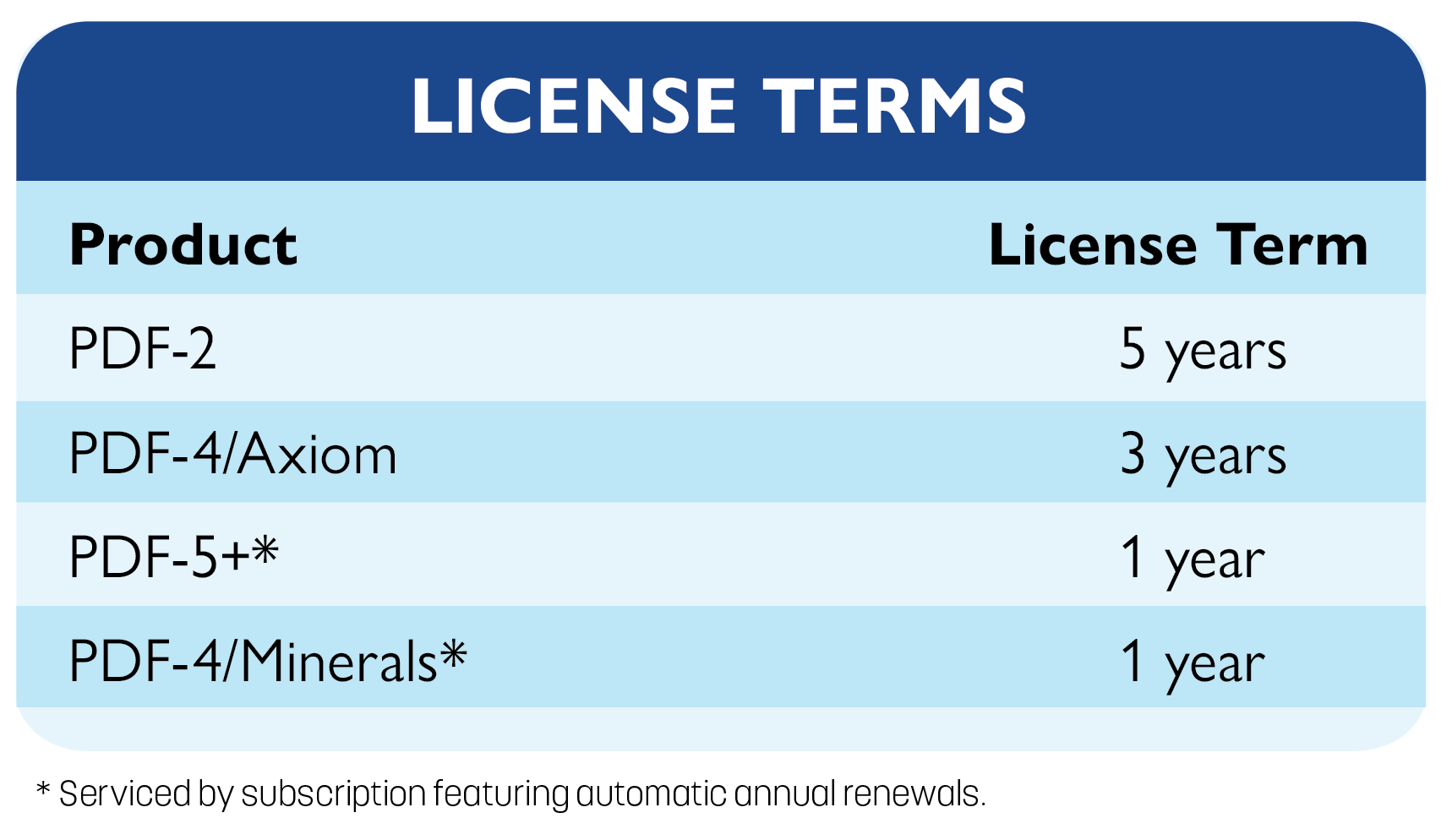
ICDD databases (PDF-5+, PDF-2, PDF-4/Minerals, and PDF-4/Axiom) are licensed on a single PC. ICDD products cannot be installed, accessed, or displayed on more than one PC without purchasing additional licenses.
ICDD products require registration. The registration key supplied by ICDD allows access to the database only through the registered PC.
How to properly install your PDF product.
How to properly register your PDF product.
Computer Specifications
ICDD tests each product release on the then current operating systems that are readily available. ICDD will support the published computer specifications for the product release year. ICDD does not guarantee product functionality or compatibility with subsequent changes in computer/hardware platforms.
- Intel® Core™ 2 Duo processors (recommended minimum) or better.
- Supported Microsoft® operating systems:
- Windows® 7 SP1
- Windows® 8/8.1
- Windows® 10
- Windows® 11
- 4 GB of system memory
- 38 GB of hard drive space
Note: It is necessary to have Administrator privileges or use the Administrator account and password for your local domain in order to install this product. You can obtain your domain by running the following command line in a Command Prompt window: ipconfig/all. Your local domain will appear next to the “Host” label.
- Intel® Core™ 2 Duo processors (recommended minimum), or better.
- Supported Microsoft® operating systems:
- Windows® 7 SP1
- Windows® 8/8.1
- Windows® 10
- Windows® 11
- 4 GB of system memory
- 4 GB of hard drive space
Note: It is necessary to have Administrator privileges or use the Administrator account and password for your local domain in order to install this product. You can obtain your domain by running the following command line in a Command Prompt window: ipconfig/all. Your local domain will appear next to the “Host” label.
- Intel® Core™ 2 Duo processors (recommended minimum), or better.
- Supported Microsoft® operating systems:
- Windows® 7 SP1
- Windows® 8/8.1
- Windows® 10
- Windows® 11
- 4 GB of system memory
- 2 GB of hard drive space
Note: It is necessary to have Administrator privileges or use the Administrator account and password for your local domain in order to install this product. You can obtain your domain by running the following command line in a Command Prompt window: ipconfig/all. Your local domain will appear next to the “Host” label.
- Intel® Core™ 2 Duo processors (recommended minimum), or better.
- Supported Microsoft® operating systems:
- Windows® 7 SP1
- Windows® 8/8.1
- Windows® 10
- Windows® 11
- 4 GB of system memory
- 5 GB of hard drive space
Note: It is necessary to have Administrator privileges or use the Administrator account and password for your local domain in order to install this product. You can obtain your domain by running the following command line in a Command Prompt window: ipconfig/all. Your local domain will appear next to the “Host” label.